Use your account number for transfers

Fast. Secure. Simple.
Transact instantly with real-time payments using Osko® and PayID®.
Fast. Secure. Simple.
Real-Time Payments
Fast
Secure
Simple

What is Osko®?

What is PayID®?
Easy Set-Up. Fast Payments
Once registered people can pay you by simply using your PayID

To Receive Money with PayID

To Send Money with PayID

Get Started with the FSCU App

Confirmation of Payee provides a layer of protection for payments to a BSB and account number by matching the account details entered with the account details held by the recipient’s bank and displaying a match outcome.
Frequently asked questions
Osko payments are usually instant or within a few seconds ¹
Yes, Osko payments are sent within your online banking. This means the same level of security that protects your existing bank account payments is applied.
A PayID is an easily remembered identifier such as your email address, mobile phone number, or ABN that is linked to your financial account (BSB and account number) at FSCU. ABN in this context also includes ACN, ARBN and ARSN.
After you create a PayID, you can tell people to make payments to it instead of giving out your financial account details.
Yes, PayID is backed by Australian banks and financial institutions. It uses the same security measures as traditional bank transfers.
A PayID can only be registered to one account. However, you can have multiple PayIDs on your profile by creating different types, i.e. one for mobile, one for email.
These can be linked to the same bank account or to different bank accounts if you prefer.
For example:
- You could have both your mobile PayID and your email PayID linked to your Everyday Transaction Account, or
- You could have your mobile PayID linked to your Everyday Account and your email PayID linked to your Offset account.
What happens to my PayID if I switch financial institutions?
If you switch banks, you’ll need to release your PayID from your old account and register it with the new one.
If you switch banks, you’ll need to release your PayID from your old account and register it with the new one.
Osko is designed to work with account numbers. When transferring funds to your FSCU account, please ensure you use FSCU’s BSB 805-013 and your account number.
For real-time payments, the daily transaction limit per membership for transferring funds to another BSB and account number or PayID, is the same as our Online Banking transfer daily limit which is detailed in our General Terms & Conditions.
Once your PayID is active, you can share it with your friends, family or clients. When someone sends you money using your PayID, the funds are usually available in your account within seconds1.
PayID removes the need to use lengthy and hard-to-remember BSB and Account Numbers for payments, making sending money simpler and more secure.




Set up Scheduled Payments
If you would like your incoming payments to be split across other accounts, such as your Home Loan or savings accounts then you will need to setup Scheduled Payments within Internet Banking.
Select Transfer > between accounts > amount and reference > select recurring > frequency, date, duration > complete transfer. If you don’t use Internet Banking you can call us on 08 8227 2222 or visit our branch and we’ll help you get everything sorted.
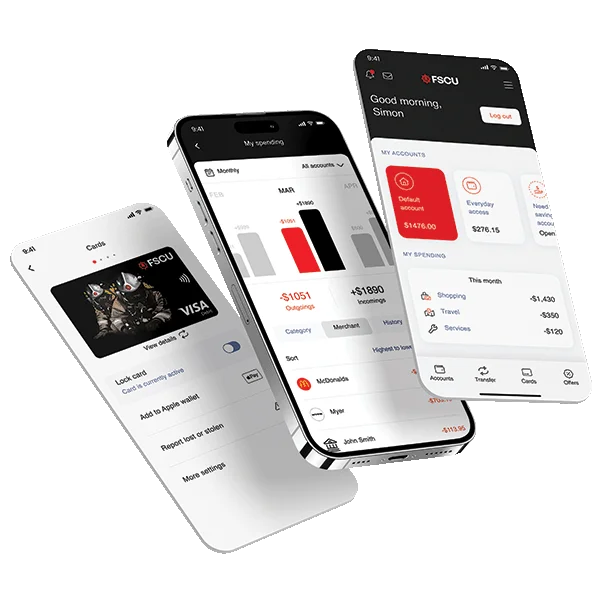
New smartphone banking app!
Packed with new features to make your financial life even easier!
The new app is available for both iOS devices and Android devices and can be downloaded from the Apple App Store or Google Play store


¹ For real-time payments to work, both the sender and receiver need to have Osko-enabled accounts. In some cases, payments may take longer to process, such as during technical disruptions, when sending to a new recipient, or if the payment is flagged for additional security checks.
Osko® is a registered trademark of BPAY Pty Ltd ABN 69 079 137 518.
PayID® is a registered trademark of NPP Australia Limited ABN 68 601 428 737.
®Registered to BPAY Pty Ltd ABN 69 079 137 518